> For the complete documentation index, see [llms.txt](https://docs.wagmi.com/wagmi/llms.txt). Markdown versions of documentation pages are available by appending `.md` to page URLs; this page is available as [Markdown](https://docs.wagmi.com/wagmi/protocol-mechanics/strategies/joining-the-strategies.md).
# Joining the Strategies
## Joining the Strategy
**How to Join a Strategy?**
To join a strategy, users need to possess two tokens that are a part of the desired pool. For instance, to participate in the ATOM/KAVA strategy, users should have both ATOM and KAVA tokens.It's essential to note that the ratio of tokens entering the pool usually doesn't maintain a 50:50 balance like in standard AMMs. This ratio is dynamic and changes with every trade based on our strategy.
**Steps to Join:**
1. Input the amount of your chosen `token0` you wish to contribute. Taking our example, let's assume it's 100 ATOM.
2. The system will then calculate the required amount of `token1`, contingent upon the amount of `token0` you plan to contribute.
Joinging the WLP position.
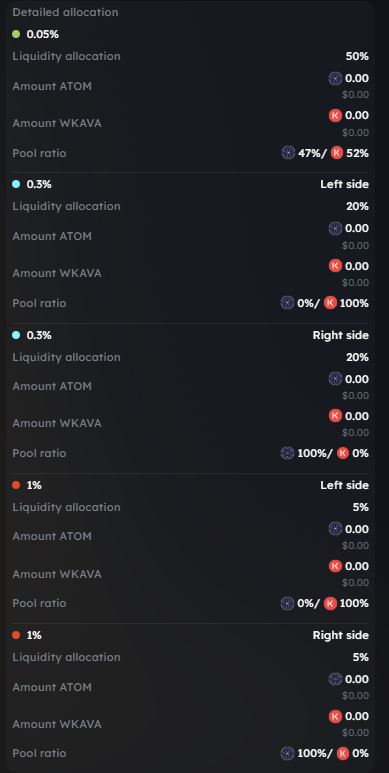
3. Detailed pool ratios and allocations can be found under the "Open position/Join" button. In our instance:
* 50% of the deposited liquidity will be allocated to the 0.05% pool.
* 20% of the deposited liquidity will be directed to the 0.3% pool - Left side.
* 20% of the deposited liquidity will be channeled to the 0.3% pool - Right side.
* 5% of the deposited liquidity will be allotted to the 1% pool - Left side.
* 5% of the deposited liquidity will be assigned to the 1% pool - Right side.
4. After joining the strategy with WLP, user gets 2 options:
Stake WLP or join GMI.
Popup after joining the WLP supported by strategies.
In option 1 - Stake - another popup will occur for user to approve and stake the desired WLP amount.
Staking the WLP.
Once you staked your WLP tokens, your position will appear under Your staked positions.
Your staked positions
**Difference Between Strategy and Staked Strategy**
If you opt to stake your WLP within our strategy, it offers the benefit of enhanced value tracking.
In the default strategy, users can merely observe the value growth of their WLP. However, in the staked strategy, users can view the exact number of tokens accrued as the liquidity remains staked. Should you wish to participate in GMI using your WLP tokens, it's necessary first to unstake your WLP.
#### Fee Structure
Wagmi protocol imposes a 20% fee for utilizing our strategies.